No. |  Model Number | Drivers |
|---|---|---|
| 1 | Xolo A500 | Download |
| 2 | Xolo A500 Club | Download |
| 3 | Xolo A500L | Download |
| 4 | Xolo A500s | Download |
| 5 | Xolo A500s IPS | Download |
| 6 | Xolo A600 | Download |
| 7 | Xolo A700 | Download |
| 8 | Xolo A1000 | Download |
| 9 | Xolo B700 | Download |
| 10 | Xolo LT900 | Download |
| 11 | Xolo Q500 | Download |
| 12 | Xolo Q600 | Download |
| 13 | Xolo Q700 | Download |
| 14 | Xolo Q700i | Download |
| 15 | Xolo Q700S | Download |
| 16 | Xolo Q800 | Download |
| 17 | Xolo Q800 X-Edition | Download |
| 18 | Xolo Q900 | Download |
| 19 | Xolo Q1000 | Download |
| 20 | Xolo Q1000s | Download |
| 21 | Xolo Q1000 Opus | Download |
| 21 | Xolo Q1010 | Download |
| 22 | Xolo Q1100 | Download |
| 23 | Xolo Q2000 | Download |
| 24 | Xolo Q3000 | Download |
| 25 | Xolo Play T1000 | Download |
| 26 | Xolo Play Tegra Note | Download |
| 27 | Xolo Tab | Download |
| 28 | Xolo Tab 7.0 | Download |
| 29 | Xolo X900 | Download |
| 30 | Xolo X910 | Download |
| 31 | Xolo X1000 | Download |
Showing posts with label XOLO. Show all posts
Showing posts with label XOLO. Show all posts
Friday, 2 May 2014
Xolo mobile usb drivers
0Thursday, 1 May 2014
How to Flash stock roms using sp flash tools
22
Pre-Requisites
SP Tool Latest : http://sh.st/flspY
VCOM Driver : http://sh.st/flsdm
ADB Drivers : http://sh.st/flshR
MTK-6589 Drivers : http://sh.st/flslo
Attention: Please follow the instructions carefully. I will not take any responsibility on whatever may happen with your phone.
Very important warning: Always make sure that you trust the sources of the ROM you download and know that it is meant for your phone.
After flashing a wrong preloader, your phone will be completely dead (can't be powered on, it will not charge and won't be detected anymore by the computer) and there is no way to recover it.
================
[Tool]SP FlashTool ||MTK Android FLASHER
http://forum.xda-developers.com/show....php?t=1982576
======================
Mediatek - Flash Tool - Info page
Mediatek - Flash Tool - Downlaod page
SP Flash Tool v. 3.1224.0212 (01.11.2013)
SP FLASH TOOLS LATEST Download LINK
SP Tool Latest : http://sh.st/flspY
VCOM Driver : http://sh.st/flsdm
ADB Drivers : http://sh.st/flshR
MTK-6589 Drivers : http://sh.st/flslo
- USB data cable
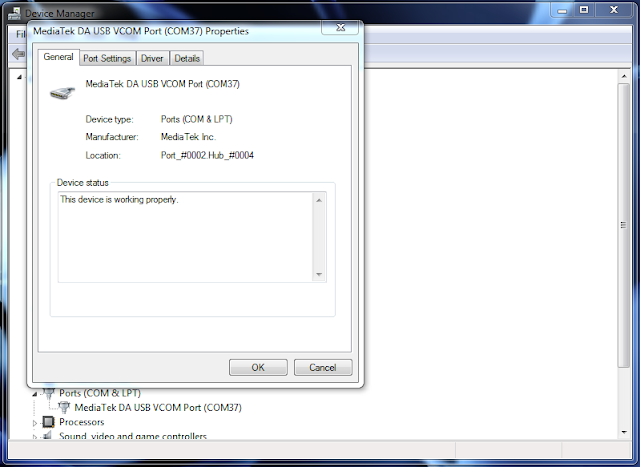
- MediaTek USB VCOM drivers
- SP Flash Tool
- First of all, make sure that you have MediaTek DA USB VCOM drivers installed.

Flashing the whole ROM
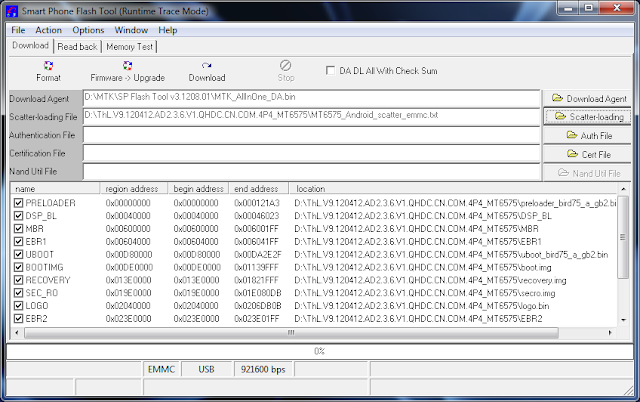
- First of all open SP Flash Tool, then click Scatter-loading button to load the correct scatter file
(MT6575_Android_scatter_emmc.txt or MT6577_Android_scatter_emmc.txt, depending on which phone you have) for your device and ignore any message that may appear.

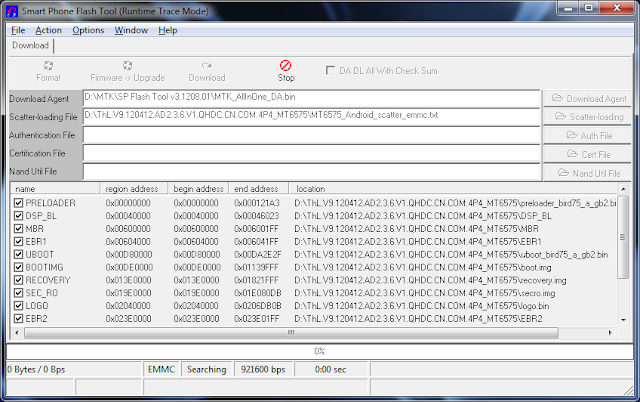
- Turn off your phone, remove the battery and replace it after some seconds (and don't turn on the phone).
- Press F9 (or hit Download button) and connect your phone into the computer via USB data cable.
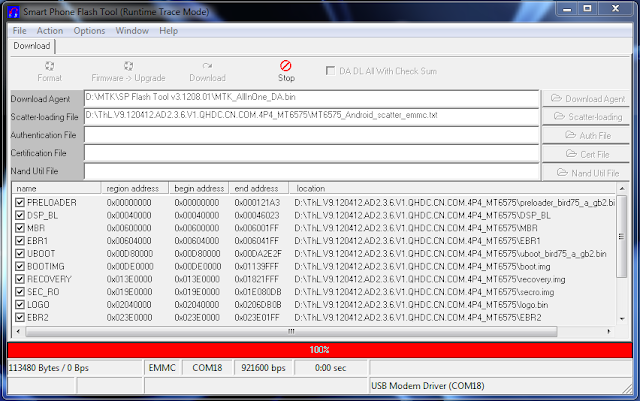
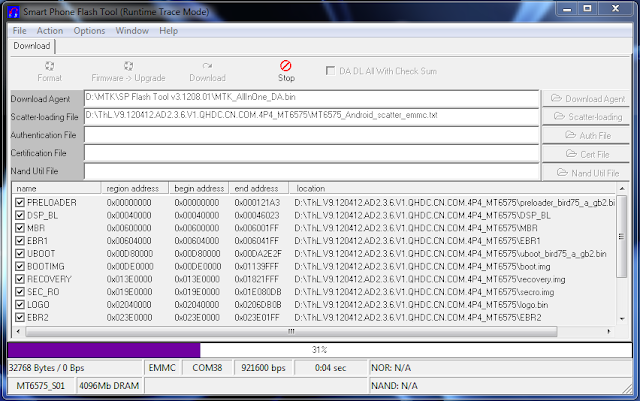
The process will start and a red progress bar will appear.


- After the red progress bar is complete, there will appear a purple progress bar.

- Right after the purple progress bar is complete, a message will appear underneath it:
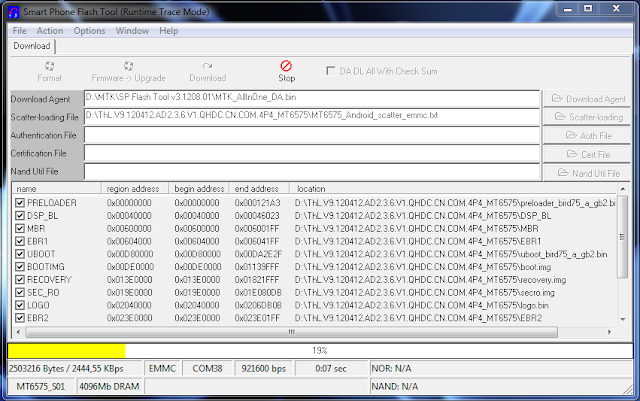
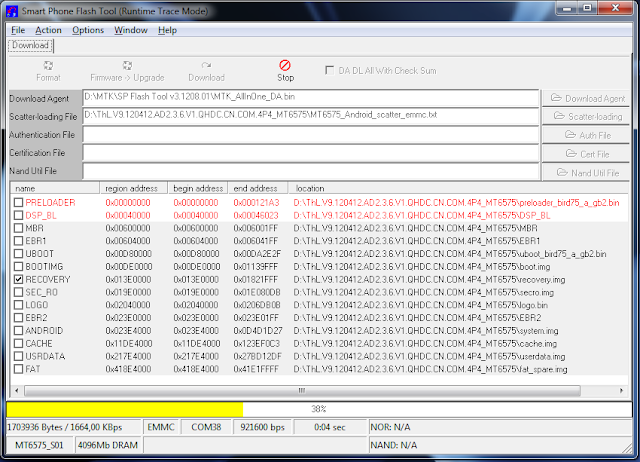
“Please insert USB cable in x seconds” and then the download will start right away (you will see the yellow progress bar filling up).

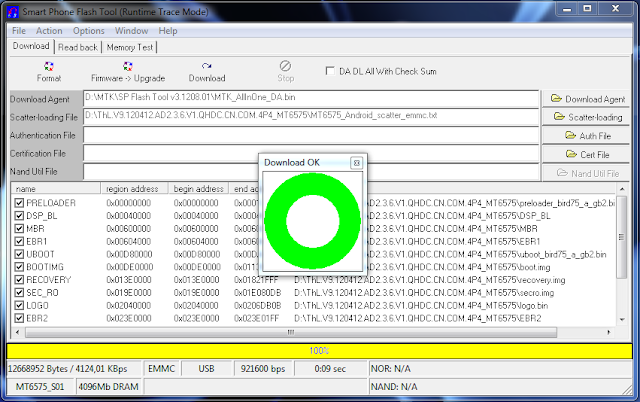
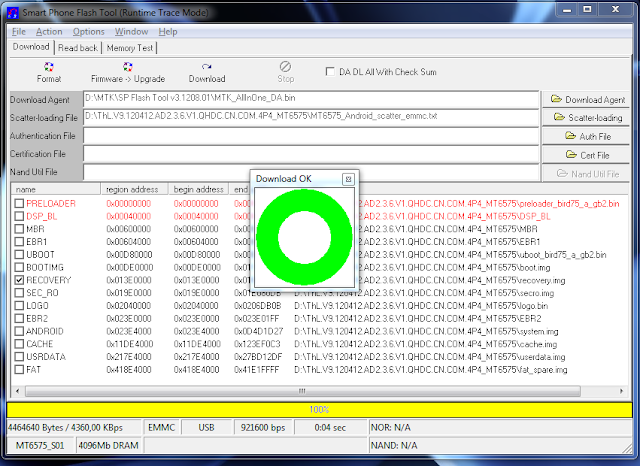
- When the yellow bar is complete, you'll get a popup with a green circle and Download OK message,
which means that the process has been successfully terminated.

- You can now safely disconnect your phone and turn it on. The process ends here.
Flashing only part of the ROM
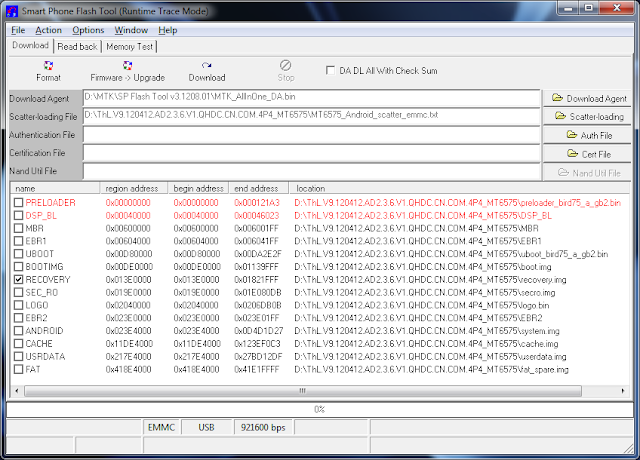
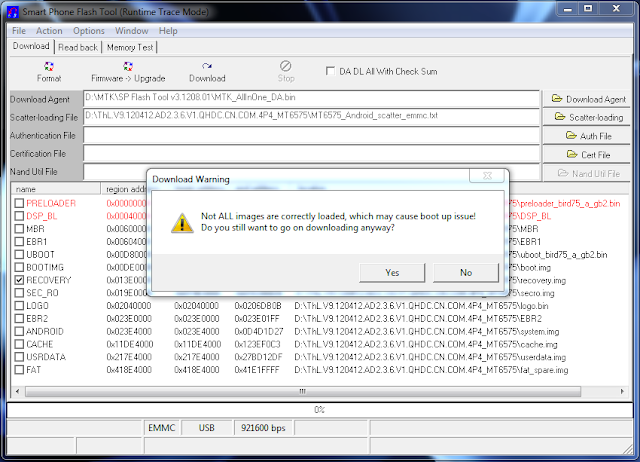
- In case you want to flash just one part of the ROM, that is also possible. In the shown example, only recovery image will be flashed.
Deselect all parts except the one(s) you want to flash and then press F9 (or hit Download button).

- The tool will immediately show a warning because not all parts are selected, but you should continue anyway. Safely press Yes to continue.

- The download of the chosen partition image will start and after the yellow bar is complete, the popup with the green circle should appear.


- Please note that, even though it isn't mandatory to select it on the list of images to flash,
preloader file must be present in the same folder as the other partition(s) that you want to flash, or else phone will not be able to enter into download mode.
Attention: Please follow the instructions carefully. I will not take any responsibility on whatever may happen with your phone.
Very important warning: Always make sure that you trust the sources of the ROM you download and know that it is meant for your phone.
After flashing a wrong preloader, your phone will be completely dead (can't be powered on, it will not charge and won't be detected anymore by the computer) and there is no way to recover it.
================
[Tool]SP FlashTool ||MTK Android FLASHER
http://forum.xda-developers.com/show....php?t=1982576
======================
Mediatek - Flash Tool - Info page
Mediatek - Flash Tool - Downlaod page
SP Flash Tool v. 3.1224.0212 (01.11.2013)
SP FLASH TOOLS LATEST Download LINK
Sunday, 1 December 2013
All Best Tweaks For Android
0
1.Virtual CPU Governor
Instructions:-
1.download the zip;
2.Extract it in titanium backup folder of your sd card;
3.Oen TBP and search 'tasker' and restore app+data;
4.start tasker and enjoy the mod.
For applications
1.apps profile
this profile unlocks 3 cores which run simultaneously when certain applications which are added in profile are launched.
When you exit from the app 2 cores will sleep and 2 cores will b open to serve.
2.heavy apps profile
this profile unlocks 4 cores which run simultaneously when certain applications which are added in profile are launched.
When you exit from the app 2 cores will sleep and 2 cores will b open to serve.
you can use any cpu app to adjust clockspeed no probs with mod.
1.apps profile
this profile unlocks 3 cores which run simultaneously when certain applications which are added in profile are launched.
When you exit from the app 2 cores will sleep and 2 cores will b open to serve.
2.heavy apps profile
this profile unlocks 4 cores which run simultaneously when certain applications which are added in profile are launched.
When you exit from the app 2 cores will sleep and 2 cores will b open to serve.
you can use any cpu app to adjust clockspeed no probs with mod.
By daily usage only 2 cpus has been unlocked if you think that any app may require some more resources then you can include that ap in apps Profile of tasker
Similarly, if you think that any app may require LOT more resources then you can include that ap in HEAVY apps Profile of tasker.
Similarly, if you think that any app may require LOT more resources then you can include that ap in HEAVY apps Profile of tasker.
MOREOVER IT IS RECOMMENDED THAT YOU SHOULD HAVE SUPERSU RO WITH WHICH U HAVE FORCED TASKER AS ROOT USER IT WILL LESSEN THE LATENCY DUE TO ROOT
DOWNLOAD:-
V2
https://docs.google.com/file/d/0B1W5lC8 ... sp=sharing
V3
http://www.mediafire.com/download/1ngq7 ... nor_v3.zip
DOWNLOAD:-
V2
https://docs.google.com/file/d/0B1W5lC8 ... sp=sharing
V3
http://www.mediafire.com/download/1ngq7 ... nor_v3.zip
2.Android 4.3 Camera

Hi all,
This is my first post here, so thought to share the awesome Android 4.3 camera app with all the users here.
This app is working flawlessly on my xolo q800 using s4 rom with all the features most notably the photosphere function working.
Beauty of this app is that it does not require u to flash your device, just install like any other applications.
Note ...... just in case you are getting "application not installed", please uninstall the existing galaxy app ( I uninstalled) using titanium backup (please take back up of your existing galaxy app before proceeding).
This app is working flawlessly on my xolo q800 using s4 rom with all the features most notably the photosphere function working.
Beauty of this app is that it does not require u to flash your device, just install like any other applications.
Note ...... just in case you are getting "application not installed", please uninstall the existing galaxy app ( I uninstalled) using titanium backup (please take back up of your existing galaxy app before proceeding).
Link....

Join them:
Like our Facebook Page here! >>> https://www.facebook.com/vipersaudio
Join ViPER's Audio Facebook Group here! >>> https://facebook.com/groups/vipersaudio.en/
ViPER's Audio Global QQ Group: http://forum.xda-developers.com/show...postcount=4586
ViPER520's Website: http://vipercn.com
ViPER's Audio forum (Chinese): http://forum.vipersaudio.com/
Like our Facebook Page here! >>> https://www.facebook.com/vipersaudio
Join ViPER's Audio Facebook Group here! >>> https://facebook.com/groups/vipersaudio.en/
ViPER's Audio Global QQ Group: http://forum.xda-developers.com/show...postcount=4586
ViPER520's Website: http://vipercn.com
ViPER's Audio forum (Chinese): http://forum.vipersaudio.com/
Instructions:
Extract the zip you'll get two files (app and irs.zip)
Install viperFx app in the folder
Open viper app
Select yes in driver installation

Grant root access when prompted

Reboot when asked to
Extract the zip you'll get two files (app and irs.zip)
Install viperFx app in the folder
Open viper app
Select yes in driver installation
Grant root access when prompted
Reboot when asked to
For people using walkman:
Use titanium backup to uninstall sound enhancements.apk

And next time you select sound enhancement in settings you'll get V4A


Use titanium backup to uninstall sound enhancements.apk
And next time you select sound enhancement in settings you'll get V4A
Using convolver and integrating irs files:
Extract irs.zip
Copy Viper4android folder in it To sd card
Reboot
After reboot use select response setting
Extract irs.zip
Copy Viper4android folder in it To sd card
Reboot
After reboot use select response setting
3.How to increase phone performance, camera performance and many more
-: TO INCREASE PHONE PERFORMANCE :-
There are many tweaks, mods and apps available to increase performance.. I am going to tell you guys the best apps that work and have given a performance boost...
List of apps and mods!
1) Seeder- entropy generator
this app does not increase RAW performance...Many Android tasks run slower than they should for one simple, yet not-so-obvious reason: they consume large amounts of random data from a limited source.. this app basically helps the device to just delete usless data and increase performance...this is a paid app but you guys can just search it on google ..
1) Seeder- entropy generator
this app does not increase RAW performance...Many Android tasks run slower than they should for one simple, yet not-so-obvious reason: they consume large amounts of random data from a limited source.. this app basically helps the device to just delete usless data and increase performance...this is a paid app but you guys can just search it on google ..
2) Pure performance x mod my xda member Jeeko!
This little mod does indeed work !! I tested it recently and I got a score of 13986 on antutu 4.0 ! this works on any ROM .....people who use nexus roms/ xperia roms use stock version..
see the list of features of this mod- http://forum.xda-developers.com/showthr … ?t=2360985
see the list of features of this mod- http://forum.xda-developers.com/showthr … ?t=2360985
4.Improving GPU performance
This system is a. Zip file less than 300 Kb big, that once extracted brings significant improvements to the system graphics. No themes, no apps, only functions that take advantage of the best of our mobile gpu
Features
- Enable GPU rendernig
- Enable dithering but did not affect consumption!!
- Use the GPU for the management of the touch
- Improve video HW render
- It allows you to play ported ARMV7 games without lags problems
- Increase scores on the AnTuTu graphic rank
- In MDPI devices improves the density pixels and brightness
- Eliminates lag system with the generator of video entropy
- Liquify the UI
- Enable dithering but did not affect consumption!!
- Use the GPU for the management of the touch
- Improve video HW render
- It allows you to play ported ARMV7 games without lags problems
- Increase scores on the AnTuTu graphic rank
- In MDPI devices improves the density pixels and brightness
- Eliminates lag system with the generator of video entropy
- Liquify the UI
Steps:-
just flash via cwm/TWRP !!
Download link- http://www.mediafire.com/download/zi7q6 … rsion).zip
Thank jeeko and consider donating to him for his work!
If my post helped in any way ..pls press thank button !!! means a lot to me!
just flash via cwm/TWRP !!
Download link- http://www.mediafire.com/download/zi7q6 … rsion).zip
Thank jeeko and consider donating to him for his work!
If my post helped in any way ..pls press thank button !!! means a lot to me!


Sunday, 17 November 2013
how to get Back IMEI NO. IN XOLO
14
Follow following steps to get back imei no.
1. First you hav to Root your phone
2. Download "mtk engineering mod" from play store.
3. Open connectivity.. ( swipe left )
4. Cds information > radio information > phone 2 .
5.Type >>>AT+EGMR=1,7,"Ur imei no. Written on the back side of your phone"<<< .
6. Tap on send at command.
7. Quit app .
8.reeboot phone
9. try to make a call... If not working change sim slot to another slot.
OR another method
Restore your IMEI 1 and IMEI 2 (No Signal Fix)(Invalid IMEI)
1. Open engineer mode (EngineerMode)
2. Swipe from right to left once.
3. In Connectivity Tab Press CDS Information
4. Press Radio Information
5. In Phone Information tab and Press Phone 2 and
type/add EMGR=1,10,"(YOUR IMEI 2 HERE)" and press SEND AT COMMAND.
6. Reboot
7. REPEAT Step 1-4
8. In Phone Information tab Enter Phone 1 and
type/add EMGR=1,7,"(YOUR IMEI 1 HERE)" and press SEND AT COMMAND.
9. Reboot
10. To check if you have a valid IMEI dial *#06#
Note:
Follow the instructions carefully.
Your IMEI 1 and IMEI 2 are indicated on the back of battery case.
Saturday, 16 November 2013
Download Xolo USB Drivers for All Models
0| 1 | Xolo A500 | Download |
| 2 | Xolo A500s | Download |
| 3 | Xolo A700 | Download |
| 4 | Xolo A1000 | Download |
| 5 | Xolo B700 | Download |
| 6 | Xolo Q600 | Download |
| 7 | Xolo Q700 | Download |
| 8 | Xolo Q700i | Download |
| 9 | Xolo Q800 | Download |
| 10 | Xolo Q1000 | Download |
| 11 | Xolo Q1000s | Download |
| 12 | Xolo T1000 | Download |
| 13 | Xolo Tab | Download |
| 14 | Xolo Tab 7 | Download |
| 15 | Xolo X900 | Download |
| 16 | Xolo X910 | Download |
| 17 | Xolo X1000 | Download |

Tuesday, 5 November 2013
How to Increase Volume On XOLO Mobile Phones
43
DIal *#446633#
enter in to EngineerMode, plz be careful, do not change any data that you do not understand, or maybe cause many BUG and you device can not use.
increase Earphone volume on XOLO mobile phone:


How to increase ringtone volume for zopo mobile phone, after setting the follow steps successfully, reboot your device.

keep the
How to increase Mic Volume
audio-normal mode
type-mic
level
level 6 is the max
level 1 is min
level 6 is the max
level 1 is min
after setting finished, reboot your device


For some version rom, we can not save the level 6. then follow this, only change the max vol to 160.

thank you
Top ten things you need to do after buying your Xolo Q800
0
By Shahid Saiyed
Top ten things you need to do after buying your Xolo Q800
1. Root and Custom Recovery:
Obviously. This would the first step anyone has to do. For those who don’t know what is rooted phone and recovery partition, you could to the link for more info. But any mediocre or pro android user would consider this as the “mother” step towards modifying your device. Recovery is something you will require for and ever.PS : While installing Recovery, I would recommend all of you to go for TWRP rather than CWM HERE
2. Backing up your Stock ROM : Wondering what a ROM is ? Well to keep it simple it is somewhat like the OS of your comp. Once you have your Recovery Installed. The first thing you have to do is BACKUP your Stock ROM. This Backup will be helpful if you damage your device(software) or what is usually called as soft bricked your phone. This Backing up of your ROM is also called NANDRIOD BACKUP.
3. CUSTOM ROM : Well this had to be the third. CUSTOM ROM are basically modified ROM. They have many goodies pre installed. There are many CUSTOM ROM available in this forum. . How To: Just go to thread of any custom rom and you will find the instructions
4. Modding or Modifying ROM : This is also a very nice feature. Here we basically edit the ROMs internal stuff to our own choice so as to make it better. XOLO Q800 is an awesome mobile, but in one this i.e. MUSIC … it has let down. But well not to worry. Many MODs have been uploaded to improve music, display, performance etc.
Here
5. Minor Tweaking: Here you basically change and uninstall some crappy system apps and other unwanted stuff. I found two apps perfect for thisTitanium Backup (Pro) Android Tweaker (Pro)
6. Root Access Browsing and Exploring: Well this is one of the main feature of rooting. You can access to the root of your phone. By doing this you can change your boot animation, boot sound, default font, Edit BUILD.prop ( This is very common while modding .. Google it for more info)etc. For this you need root explorer APP : Root Explorer :https://play.google.com/store/apps/detai...orer&hl=en – PAID Root Browser : https://play.google.com/store/apps/detai...free&hl=en
7. Apps and Data backup : Well this is very common backup. It is basically copying all your files,apps and their data ,so that you can recover later .. Well undoubtedly the ultimate app for this is TITANIUM BACK UP (root req) and even there is one more app MY BACKUP (root not necessary) .
8. INSTALLING SOME TOP CLASS/USEFUL APPS : My list . These are just for general day to day purpose.• Adobe Reader• Avast Antivirus• All-in-one Tollbox• Android Tweaker Pro• Battery Doctor • Beautiful Widgets• BusyBox pro• Camera Pro • Chrome• File Expert Pro / ES File Explorer :http://android.appstorm.net/roundups/uti...r-android/ • Flash Light• Lucky patcher• Mobile Care by IObit• MX video player • Nova Launcher / Holo Launcher• Office Suite Pro• Poweramp (Music Player) / Walkman / Rocket Music Player Pro
Root Explorer / Root Browser + ROM manager (pro)
• SuperSu Pro (Obviously it is there in every rooted phone..)• Tapatalk 2• Teminal Emulator • Zooper Widget
9. Volume Increase:-Dial *#443366# on stock dail paid and follow this trick to increase volume http:///.../THAT’S IT FOR NOW.. THIS IS JUST MY OPINION .. AND MY IDEA .. IT MAY VARY FROM ONE PERSON TO OTHER..
Subscribe to:
Posts (Atom)
Popular Posts
-
 Pre-Requisites SP Tool Latest : http://sh.st/flspY VCOM Driver : http://sh.st/flsdm ADB Drivers : http://sh.st/flshR MTK-6589 Dri...
 -
 Follow following steps to get back imei no. 1. First you hav to Root your phone 2. Download "mtk engineering mod" from play st...
 -
 Warning: This Flashable Zip Is For Omega Hd 2.0 Build 49 Users. For Build 7 Users Download The New Boot.Img I Uploaded (Link Posted...
 -
 New NoteIII MetalBlueGoA Rom Rebuilt modes: Improved interface Rebuilt system software Remade graphics system For camera R...
 -
 If you’re looking for an easy guide that will help you know how to root Xolo Q800 X then your search ends right here. Today, I’ll be t...


© 2013 iPRESS. All rights resevered. Designed by Templateism